

What’s the SQL Server error log?
It’s a file used by SQL Server to write data about events such as backups, stack dumps, and a lot of other informational events.
Why should you care about it?
When the SQL error log gets too big, it’s harder to open it up. Therefore, you want to keep the file small.
It’s easier for errors to “hide” bigger files.
Troubleshooting will be crippled.
Not having enough error log files (configured to keep 7 log files, max available is 99) makes troubleshooting more difficult. Some data patterns cannot be found.
If you hit a problem, which requires multiple SQL Engine restarts or reboots, every time you do that, SQL will create a new error log file.
Since you only set up to keep six files, the oldest one gets deleted, which can quickly erase files needed for investigating or troubleshooting purposes.
How to fix it?
The solution is to recycle the error log regularly and increase the number of files retained.
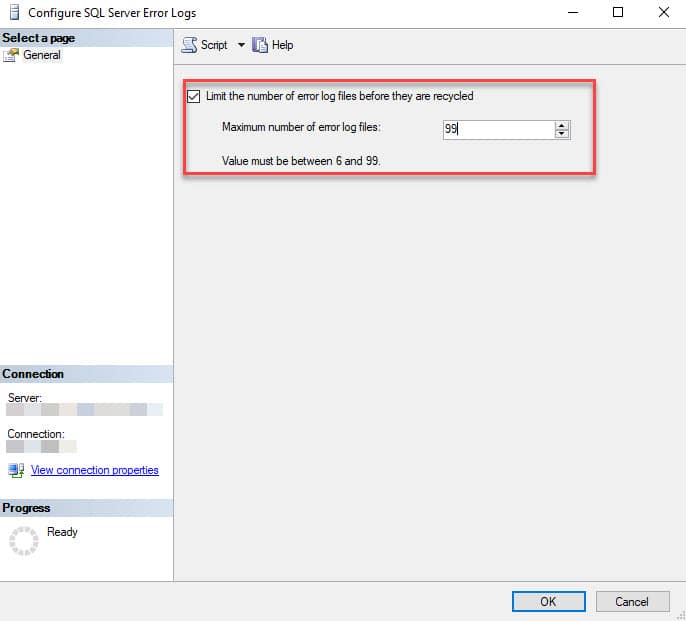
Set up to keep 99 SQL Server error log files.
- Open Management Studio (SSMS).
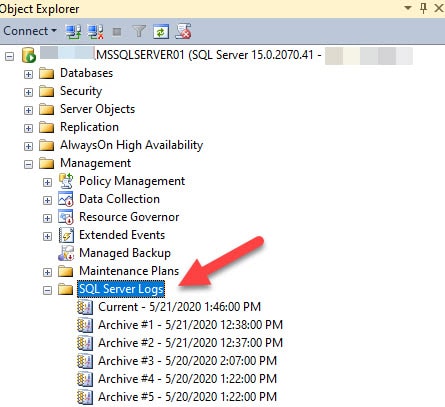
- Expand the instance, then Management, right-click on SQL Server Logs, and select Configure.
- Enable "Limit the number of error log files before they are recycled" and then enter a value for the maximum number of error log files.
Create a SQL Agent job to recycle the error log
Rotate the error log every 24 hours or every 7 days so that each day/week a new file is created (best practices recommend doing this weekly).
You can use the script below to create the SQL Server Agent job.
- It will create a job named ‘_Maint – SQL Error Log Cycle’. Alter the variable
@Job_nameif you want to change it. - The script will create a schedule to run nightly (every Monday at 12:00 AM). You can change the parameters for sp_add_jobschedule and schedule it to another date.
USE [msdb]
GO

BEGIN TRANSACTION

DECLARE @ReturnCode INT

SELECT @ReturnCode = 0

IF NOT EXISTS (
		SELECT name
		FROM msdb.dbo.syscategories
		WHERE name = N'[Uncategorized (Local)]'
			AND category_class = 1
		)
BEGIN
	EXEC @ReturnCode = msdb.dbo.sp_add_category @class = N'JOB'
		,@type = N'LOCAL'
		,@name = N'[Uncategorized (Local)]'

	IF (
			@@ERROR <> 0
			OR @ReturnCode <> 0
			)
		GOTO QuitWithRollback
END

DECLARE @jobId BINARY (16)

EXEC @ReturnCode =   msdb.dbo.sp_add_job @job_name = N'_Maint - SQL Error Log Cycle'
	,        @enabled = 1
	,        @notify_level_eventlog = 0
	,        @notify_level_email = 0
	,        @notify_level_netsend = 0
	,        @notify_level_page = 0
	,        @delete_level = 0
	,        @description = N'Cycle SQL Error Log (daily), so files don''t grow too large.'
	,        @category_name = N'[Uncategorized (Local)]'
	,        @owner_login_name = N'sa'
	,@job_id = @jobId OUTPUT

IF (
		@@ERROR <> 0
		OR @ReturnCode <> 0
		)
	GOTO QuitWithRollback

EXEC @ReturnCode = msdb.dbo.sp_add_jobstep @job_id = @jobId
	,@step_name = N'Cycle SQLError log'
	,        @step_id = 1
	,        @cmdexec_success_code = 0
	,        @on_success_action = 1
	,        @on_success_step_id = 0
	,        @on_fail_action = 2
	,        @on_fail_step_id = 0
	,        @retry_attempts = 0
	,        @retry_interval = 0
	,        @os_run_priority = 0
	,@subsystem = N'TSQL'
	,        @command = N'EXEC sp_cycle_errorlog;'
	,        @database_name = N'master'
	,        @flags = 0

IF (
		@@ERROR <> 0
		OR @ReturnCode <> 0
		)
	GOTO QuitWithRollback

EXEC @ReturnCode = msdb.dbo.sp_update_job @job_id = @jobId
	,@start_step_id = 1

IF (
		@@ERROR <> 0
		OR @ReturnCode <> 0
		)
	GOTO QuitWithRollback

DECLARE @mydate VARCHAR(8)

SELECT @mydate = CONVERT(VARCHAR(20), getdate(), 112)

EXEC @ReturnCode = msdb.dbo.sp_add_jobschedule @job_id = @jobId
	,@name = N'Run nightly'
	,        @enabled = 1
	,        @freq_type = 8
	,        @freq_interval = 2
	,        @freq_recurrence_factor = 1
	,          @freq_subday_type = 1
	,        @freq_subday_interval = 0
	,        @freq_relative_interval = 0
	,        @active_start_date = @mydate
	,        @active_end_date = 99991231
	,        @active_start_time = 0
	,        @active_end_time = 235959 --, @schedule_uid=N'ec6602b8-b42f-4ada-a9f5-5a72424206dc'

IF (
		@@ERROR <> 0
		OR @ReturnCode <> 0
		)
	GOTO QuitWithRollback

EXEC @ReturnCode = msdb.dbo.sp_add_jobserver @job_id = @jobId
	,@server_name = N'(local)'

IF (
		@@ERROR <> 0
		OR @ReturnCode <>;0
		)
	GOTO QuitWithRollback

COMMIT TRANSACTION

GOTO EndSave

QuitWithRollback:

IF (@@TRANCOUNT > 0)
	ROLLBACK TRANSACTION

EndSave:
GO